Are cheap multi-port chargers bad for battery health? The honest answer depends on design, not price alone. A charger shares its available power across ports, so plugging in a second device may slow charging. USB-IF’s USB Power Delivery 3.1 specification allows compatible systems to deliver up to 240 watts. That figure describes the standard’s maximum, not what every charger supplies. A phone also manages charging internally; the adapter does not simply force its full rated power into the battery.
That distinction matters. Apple’s battery guidance identifies temperature and charging conditions as factors that can affect battery lifespan. Cadex Electronics founder and battery expert Isidor Buchmann has said, “A battery is like a human being. It needs exercise but too much can be harmful.” The point is moderation, not a claim that every inexpensive charger damages batteries. Still, uncertainty remains. Poorly regulated output, excessive heat, or unstable power could create problems, while a compliant charger that matches the device’s requirements may work normally. Cheap is not proof. For a practical check, notice whether the adapter or cable becomes unusually hot, whether charging repeatedly disconnects, or whether power drops sharply when another port is used. This introduction separates measurable charging behavior from marketing claims. The sections ahead examine power sharing, safety certifications, heat, and the warning signs worth taking seriously. An independent test is more useful than price alone.
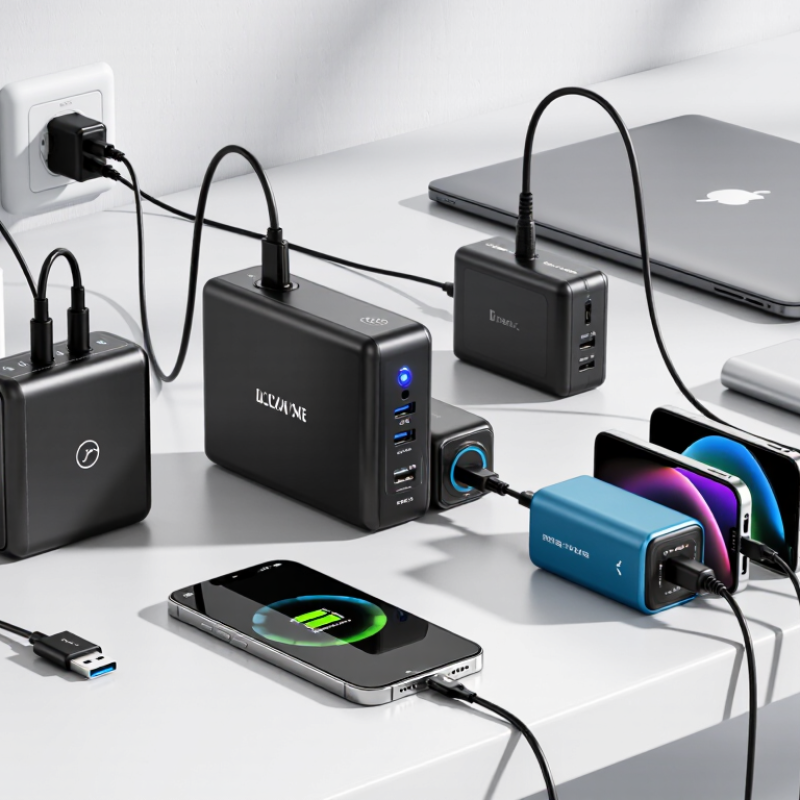
A multi-port charger shares a limited power budget; its total rating is not available on every port at once. A 65-watt unit, for example, may reduce a laptop’s output when a phone is connected. The exact split depends on its circuitry and printed port ratings. No universal split exists. Devices also negotiate power through supported charging protocols, then draw only what their charging systems allow.
Small detail. If a second device triggers renegotiation, charging may pause briefly or slow down. Usually, that alone does not damage a battery: the device manages charging current and temperature. Heat is the greater concern. A poorly regulated charger, damaged cable, or hot charging spot on a bedside table deserves attention.
Cheap price alone proves little; check independent safety testing and the charger’s output label. I would not assume two identical-looking adapters divide power the same way. That detail is easy to miss.
A phone battery does not take power blindly. Charging circuitry monitors voltage and temperature, then adjusts current as the battery fills. With lithium-ion batteries, charging typically slows near full capacity. Heat matters because high temperatures can speed battery aging. A multi-port charger may also divide its available output when several devices are connected, making charging slower without harming the battery.
Tips: Check that the charger lists clear output ratings and recognized safety certifications. Use a sound cable, and unplug the charger if it becomes unusually hot, smells burnt, or makes crackling sounds. Warmth alone isn’t proof of damage.
A low price does not automatically mean a charger is unsafe. What matters is whether it regulates power reliably and handles heat properly. In everyday use, watch for repeated charging interruptions, a hot phone, or a charger that gets much hotter than usual. Some warmth during fast charging is normal, especially in a warm room. I used to treat any warmth as a warning, but that was too simplistic; temperature, charging speed, and room conditions all play a part. A charger’s exterior can feel cool while its internal components work hard, so don’t judge it by touch alone.
A charger’s headline wattage is only a ceiling. Check the small print for each port’s output, not just the total printed on the case. A three-port unit may share its power when several devices are connected, lowering the output available to each. USB-IF’s USB Power Delivery 3.1 specification allows up to 240 watts, but that level requires compatible devices, cables, and negotiated power profiles. More watts do not automatically mean faster or safer charging.
Match the charger’s listed voltage and charging protocol to your device’s requirements. USB-C alone does not guarantee support for USB Power Delivery or Programmable Power Supply. Check the cable’s rated wattage, too. For a multi-port charger, test the exact combination you plan to use; the output can change when another device is plugged in. Small detail, big difference. A basic USB-C meter can show negotiated voltage and current, though readings may vary with the device’s charge level.
Look for verifiable safety certification, such as testing to IEC 62368-1, and confirm the certificate with the issuing organization. Inspect the casing and ports for cracks, looseness, or unusual heat during use. I would not judge quality by weight alone; a heavier adapter can still have poor compatibility. And one honest limitation: a quick check cannot reveal every internal electrical fault.
To identify charging problems, watch for repeatable changes rather than blaming a charger after one warm session. Note the starting battery percentage, charging time, cable, and which ports are occupied. Then repeat the test with the same phone and cable, using one port at a time. A sharp slowdown only when several devices share power may indicate the charger is dividing its output. Stop using it if its casing becomes unusually hot, charging repeatedly disconnects, or the device displays a temperature warning.
Heat deserves attention. Battery University’s BU-808 technical table estimates that a lithium-ion battery stored at full charge retains about 80% capacity after a year at 25°C, versus about 65% at 40°C. These are storage estimates, not proof that a particular charger caused battery damage. Still, persistent warmth during charging is worth investigating. A warm cable alone proves little; I would not diagnose damage by touch alone.
Look for patterns. If battery life drops across several days, compare the phone’s battery-health readings and check whether the drain continues with a known-good, standards-compliant charger. USB Power Delivery devices negotiate supported voltage and power; a charging label alone does not confirm that negotiation is working correctly. A swollen battery, sudden shutdowns, or a burning smell calls for immediate disconnection and professional inspection. Battery readings can be imperfect, too, so record the change over time rather than trusting one percentage.
A cheap multi-port charger may pose a battery risk when its power control is poorly designed or its stated output is misleading. A phone usually manages its own charging, so a low price alone does not mean battery damage. Still, unstable voltage, excessive heat, or faulty USB-C power negotiation can create trouble. Watch for a charger that becomes uncomfortably hot, makes a faint buzzing sound, or repeatedly disconnects when another device is plugged in. Those signs deserve attention.
Shared ports can also change how much power each device receives. For example, connecting a tablet may reduce the power available to a phone. That should normally slow charging, not harm the battery. But weak protection against overload or short circuits can increase heat and stress charging components. Heat matters. If the phone feels unusually warm near the charging port, stop using that charger and check the cable and outlet too. I might be wrong about the cause; warmth can come from heavy phone use, not just the charger.
Tips: Choose a charger with clearly stated output ratings and built-in overcurrent and temperature protection. Use an undamaged cable rated for the device’s charging standard. Test one device at a time, then add others and check for excess heat. Avoid charging under bedding. If charging becomes erratic, replace the charger rather than waiting for a clear failure.
| Situation or Check | What You May Observe | Battery Risk | Practical Response |
|---|---|---|---|
| Several devices are connected at once | Charging slows or the charger reallocates power between ports. | Usually low. Reduced charging speed alone does not indicate battery damage. | Check the charger’s total output and port-sharing specifications; use one port if faster charging is needed. |
| The charger or plug becomes unusually hot | Excessive heat, a hot-plastic smell, discoloration, or a softening enclosure. | Potential safety concern. Heat can also raise a connected device’s temperature, which is undesirable for its battery. | Unplug it and stop using it if it is excessively hot, damaged, or smells burnt. Keep chargers uncovered and well ventilated. |
| Charging repeatedly disconnects or restarts | The charging indicator flickers, or the device repeatedly starts and stops charging. | Not proof of battery damage, but it may indicate unstable power, a poor cable, a loose port, or incompatible power negotiation. | Test with a known-good cable and a reputable, compatible power adapter. Stop using the charger if the problem persists. |
| The charger lacks clear output ratings or safety information | No legible input/output specifications, unclear port ratings, or no identifiable manufacturer or importer information. | Risk is harder to assess. Poorly designed or non-compliant electronics may lack adequate safeguards. | Choose a charger with readable ratings, appropriate safety certification for your region, and documented protection features. |
| USB-C fast charging is slower than expected | The device charges at a lower rate when other ports are occupied, or fast charging does not activate. | Generally a compatibility or power-allocation issue, not evidence that the battery is being harmed. | Confirm that the charger, cable, and device support a compatible USB Power Delivery profile and that the chosen port supplies enough power. |
| The device gets unusually hot while charging | The device becomes hotter than usual, especially during light use or while idle. | Sustained high battery temperature can contribute to faster battery aging; the charger is only one possible cause. | Disconnect it, let the device cool, remove insulating covers, and retry with a compatible charger. Seek service if overheating continues. |
| A battery swells, leaks, or the device casing separates | Visible swelling, a distorted case, leakage, smoke, or an unusual chemical odor. | Serious battery hazard. These signs require action regardless of which charger was used. | Stop charging and using the device. Do not puncture or press the battery; contact a qualified repair provider or local battery-recycling service. |
| The charger has credible safety documentation and behaves normally | Ratings are clear, charging is stable, and there is no abnormal heat, smell, or physical damage. | A low price alone does not establish that a charger will harm a battery. The design, compliance, condition, and compatibility matter. | Use the charger according to its specifications and the device maker’s guidance; replace it if it becomes damaged or behaves abnormally. |
Note: A device’s internal charging circuitry manages battery charging. A compliant, compatible multi-port charger typically supplies power within negotiated limits; sharing power between ports most often affects charging speed rather than battery health.
No. Its total power is shared. A 65-watt charger may reduce laptop output when you connect a phone.
The charger’s circuitry and printed port ratings determine the split. Devices also negotiate power and draw only what they support.
Yes. Power may be renegotiated, causing a short pause or slower charging. Usually, this does not harm the battery.
No. A protocol may allow up to 240 watts, but that does not mean every port supplies it simultaneously. Small detail.
Its charging circuitry monitors temperature and voltage, then adjusts current. Charging typically slows near full capacity.
Not always. Fast charging and a warm room can make a phone or charger feel warm. Touch alone can mislead.
Unplug it if it becomes unusually hot, smells burnt, or makes crackling sounds. Warmth alone isn’t proof of damage.
Read its output ratings and look for recognized safety certifications. Use a sound cable, and watch for repeated interruptions. I used to judge by price; that was too simplistic.
Are cheap multi-port chargers bad for battery health? Not necessarily. Their effect depends on how they distribute available power, whether their output matches each connected device, and how well they manage electrical and thermal conditions. Batteries and devices generally regulate charging and limit heat, but that protection works best when the charger provides stable, compatible power. When several devices are connected, a charger may divide its capacity or reduce output, which can make charging slower without harming the battery.
To assess a charger, check its stated output, supported charging standards, safety features, and compatibility with your devices. Watch for unusual heat, repeated charging interruptions, unexpected battery drain, or a device that struggles to charge; these signs may indicate a charger, cable, or device problem. Stop using a charger that becomes excessively hot or shows visible damage. A low price alone does not prove a charger is unsafe, but poor build quality, unreliable power, and inadequate heat control can increase risk.

RF-Core Charger