Fast charging can turn a nearly empty phone into a useful tool during a short break. However, the cable alone does not create charging speed. The charger, device, charging protocol, and cable must work together. A thick connector or premium finish proves very little. Looks can deceive. This guide explores how to tell if a cable supports fast charging through specifications, physical details, and practical testing. It also explains why some cables charge quickly with one device but slowly with another.
The inspection begins with the cable’s printed ratings. Look for supported wattage, voltage, current, USB standard, or Power Delivery compatibility. A cable marked 100W should provide more evidence than one labeled only “fast charge.” USB-C cables may also contain an e-marker chip, which helps compatible devices identify higher power capabilities. Still, packaging claims can be vague. Check the manufacturer’s technical page when possible. Small details matter, including connector type, cable length, build quality, and resistance.
A reliable test uses the same charger and phone while comparing cables under similar battery conditions. Watch the charging notification, measured wattage, and temperature. A USB power meter can provide clearer evidence than a phone icon alone. Check the specifications. Safety matters too. Damaged insulation, loose connectors, or excessive heat should end the test immediately. No single clue proves everything, and charging speed can change as the battery fills. That limitation is easy to overlook. By combining documented ratings with careful observation, readers can make a more informed choice and avoid paying extra for a cable that only looks capable.
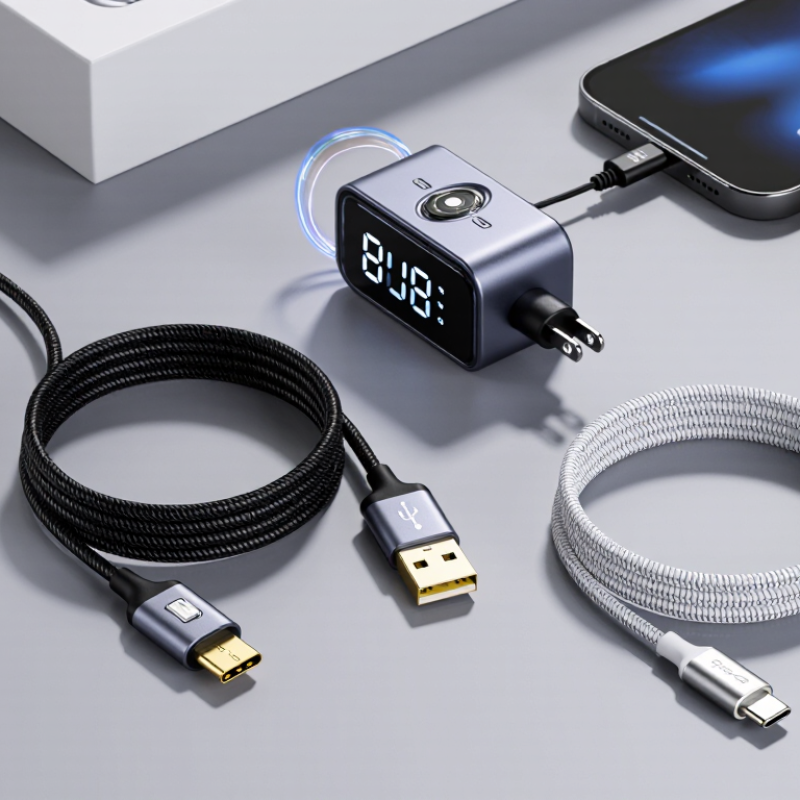
A fast-charging cable must match a recognized charging standard and a verified power rating. USB Power Delivery 3.1 defines up to 240 watts through Extended Power Range, while Standard Power Range reaches 100 watts, according to USB-IF specification data. The connector shape alone proves nothing. A USB-C cable may support charging, data transfer, or both. Labels can mislead.
Check the printed rating, such as 60W or 240W, and compare it with the charger’s output. Power equals voltage multiplied by current. A 100W charger cannot deliver 100W through a 60W cable. Cables above 3A commonly require an electronic marker, which helps the charger identify their safe current capacity. IEC 62680-1-3 provides technical requirements for USB-C connectors and cables. Look for compliance information, not vague phrases like “super fast.”
The European Commission’s common-charger impact assessment estimated that discarded and unused chargers create about 11,000 tonnes of electronic waste annually. A correctly rated cable can reduce unnecessary replacements, although durability still depends on construction and handling. Try a simple test: charge the same device with a known charger, then check charging power through the device’s diagnostics. Heat around the connector deserves attention. Stop using damaged insulation or loose plugs. I have found that many charging claims omit data speed and temperature limits. That omission matters. Read the fine print.
A fast-charging cable must physically match both ends of your setup. Check the device port first, then inspect the charger output port. A USB-C device usually needs a USB-C-to-USB-C cable for modern Power Delivery charging. An older rectangular USB-A charger needs a USB-A-to-USB-C cable instead. The connector shape matters.
It is only the beginning.
Connector matching does not guarantee maximum speed. USB-IF’s USB Power Delivery 3.1 specification defines power levels up to 240 watts, but the charger, device, and cable must support compatible limits. A 100-watt charger cannot deliver that output through an unsuitable cable. Likewise, a cable marked only for basic charging may reduce performance, even when both connectors fit. For higher power ratings, look for clear wattage labeling and certified cable information.
A simple desk test can reveal problems. Connect the cable firmly, start charging, and watch whether the device reports rapid charging. Check for warmth, loose movement, or repeated charging interruptions. Data transfer capability can also matter, because some cables support charging but offer limited data speeds. I sometimes focus too much on the connector and overlook the cable’s internal rating. That is an easy mistake. When specifications are unclear, choosing a shorter, clearly rated cable is usually the more reliable decision.
A USB-C plug does not automatically mean fast charging. Read the cable label carefully. Look for a stated power rating, such as 60W, 100W, or 240W. The USB Power Delivery Specification Revision 3.1 defines charging levels up to 240W through Extended Power Range. A cable showing only “USB-C” may support much less.
Check for E-Marker support when higher power is required. An E-Marker is a tiny identification chip inside the cable. It reports the cable’s current, voltage, and performance limits to compatible chargers and devices. The USB Type-C Cable and Connector Specification requires electronically marked cables for certain higher-current applications, especially 5A operation. Without that chip, a charger may reduce power for safety.
Inspect the packaging, not only the connector shell. Reliable labels should state power and data capability separately. A cable might deliver 100W but transfer data at basic USB 2.0 speeds. That difference matters when moving large video files. Certification logos also help, but printed claims can still be vague. I have found cables with bold “fast charge” wording and no wattage. That is a warning sign. Check the model documentation when possible. The specifications are clearer than the marketing. Testing remains useful, because cable quality can vary between batches.
A cable cannot be judged by appearance alone. To test whether it supports fast charging, use a compatible device, charger, and wall outlet. The device and charger must support the same charging standard. Otherwise, a capable cable may appear slow. Charge the device from about 20 percent, not near full. Fast charging often reduces speed after 70 or 80 percent. Record the battery level, time, and room temperature. Keep other conditions unchanged.
My first test was misleading. I compared two cables while using different battery levels. The result looked precise, but it was not fair. A better method uses the same device and charger. Let the device cool, then charge each cable for ten minutes. Use a stopwatch and record the battery percentage before and after. Repeat each test twice. A USB power meter can show voltage and current, but readings may fluctuate during charging. Do not trust one number.
Check the cable during the test. It should remain mildly warm, without damaged insulation, loose connectors, or an unusual odor. A longer cable may create more resistance under higher power. Heat, battery health, software activity, and screen use can also reduce charging speed. Close demanding apps and keep the screen off for a fairer comparison. Results may still vary.
| Cable Configuration | Typical Power Capability | Power-Identification Feature | Maximum Data Rate | Compatible Test Setup | Measured Charging Result | How to Identify It | Assessment |
|---|---|---|---|---|---|---|---|
| USB-C to USB-C, 3 A | Up to 60 W at 20 V / 3 A | Usually no electronic marker required | Up to 480 Mbps when wired for USB 2.0 | 60 W USB-C charger, USB-C device, inline power meter | Approximately 58–60 W when the device accepts the full rating | Check printed specifications and verify a 20 V / 3 A power contract | Suitable for many phones, tablets, and smaller laptops |
| USB-C to USB-C, 5 A with electronic marker | Up to 100 W at 20 V / 5 A under standard USB Power Delivery | 5 A electronic marker chip is required | Commonly 480 Mbps or 5 Gbps, depending on internal wiring | 100 W USB-C charger, compatible laptop, power meter | Approximately 90–100 W when the charger and device negotiate 20 V / 5 A | Use a USB-C tester to confirm the advertised current capability | Recommended for high-power laptops and docking setups |
| USB-C to USB-C, extended-power cable | Up to 240 W at 48 V / 5 A with extended USB Power Delivery | 5 A electronic marker and extended-power support are required | Depends on the cable design; power capability does not guarantee high data speed | 240 W-compatible charger, supported laptop, certified power meter | Up to approximately 180–240 W only when every component supports the higher power mode | Confirm the cable label, electronic-marker reading, and negotiated voltage | Designed for high-performance laptops and other high-power equipment |
| USB-A to USB-C, standard charging cable | Commonly up to 15 W; higher results depend on the charger protocol | USB-A output generally does not use USB-C 5 A cable marking | Up to 480 Mbps for typical charging cables | USB-A charger, USB-C phone, current and voltage meter | Approximately 5–15 W, depending on the charger, device, and charging protocol | Measure the actual current; do not infer speed from the USB-C connector alone | Often slower than USB-C to USB-C fast charging |
| USB-C cable with USB 2.0 internal wiring | May support 60 W or 100 W if the power rating is properly specified | Charging capability and data capability are separate specifications | Up to 480 Mbps | Fast USB-C charger, compatible device, file-transfer speed test | Can reach the cable's power rating while transferring data at USB 2.0 speed | Test both the negotiated power and the actual file-transfer rate | Fast charging does not necessarily mean fast data transfer |
| USB-C cable with USB 3.2 Gen 1 wiring | Power capability varies; commonly 60 W or 100 W versions are available | May include an electronic marker for 5 A operation | Up to 5 Gbps | Compatible fast charger, device, power meter, and storage-speed test | Charging reaches the negotiated power level; data transfer can approach 5 Gbps under ideal conditions | Review the cable specification and verify both power and data performance | Balanced option for fast charging and everyday data transfer |
| Cable with unknown or incomplete specifications | Cannot be reliably determined from appearance | No clear current rating, power rating, or electronic-marker information | Unknown | Use a low-risk compatible charger, power meter, and device with charge monitoring | Results may be limited to basic charging, often below 15 W | Stop testing if the connector becomes hot, charging repeatedly disconnects, or readings fluctuate | Not recommended for high-power charging |
Note: Actual charging speed is determined by the cable, charger, device, charging protocol, battery temperature, and battery charge level. The lowest-rated component limits the final power.
A cable cannot create power that the charger or device does not provide. Its job is to carry current safely between them. I learned this after testing several cables with the same charger and phone. Charging speeds changed noticeably, even when the connectors looked identical. Check the cable jacket, packaging, or technical sheet for its supported current and power rating. A cable rated for higher current may include an electronic identification chip, often called an e-marker. This chip helps compatible devices recognize the cable’s limits.
The charger sets the available power, while the device controls how much it accepts. A high-rated cable may still charge slowly with a basic adapter or an older device. Heat can also reduce performance. Feel the connectors after several minutes, but do not treat warmth as proof of fast charging. A power meter can show the actual voltage and current more reliably than a charging icon. My own quick tests were imperfect because battery level, temperature, and background activity changed the results. That is worth remembering.
Tips: Match the cable rating to the charger output and device input. Inspect for loose connectors, damaged insulation, or unexplained heat. Try one cable with two known-compatible chargers. If results differ, the limitation may come from the charger, device, or charging protocol—not the cable. Check the specifications twice. Labels can be vague.
No. The connector shape proves very little. The cable may support charging, data, or both. Check its power rating.
Inspect both ports first. Use USB-C to USB-C for compatible modern charging systems. Use USB-A to USB-C with older rectangular ports.
No. A cable rated for 60 watts cannot safely carry 100 watts. Power depends on voltage, current, and compatible limits.
Look for clear ratings such as 60W or 240W. Compliance details are more useful than vague claims like “super fast.”
Start near 20 percent battery. Use the same charger and device. Charge for ten minutes, then record the percentage change.
Battery level, temperature, screen use, and software activity affect results. My first comparison failed because the starting levels differed.
Mild warmth can occur. Stop using the cable if the connector becomes very hot, smells unusual, or has damaged insulation.
It can. Longer cables may create more resistance at higher power. A shorter, clearly rated cable is often the safer choice.
No. Some cables charge quickly but transfer data slowly. Check data-speed details separately. I often overlook this point.
Compare the printed rating with your charger’s output. Avoid relying on appearance. Choose a clearly labeled cable, even if the result feels less exciting.
How to tell if a cable supports fast charging starts with checking its charging standard and power rating. Look for clear information about supported wattage, current, and voltage, then make sure the cable’s connectors match both your device and charger. For USB-C cables, labels can provide useful clues, while an E-Marker chip may be required for higher-power charging and advanced capabilities.
The most reliable way to confirm performance is to test the cable with a compatible device and charger while monitoring charging speed. Keep in mind that a cable is only one part of the charging system. The charger must provide sufficient power, and the device must be designed to accept it. If any component has a lower limit, the overall charging speed will be restricted, even when the cable itself supports fast charging.

RF-Core Charger